
Support
Support
How to open a MusicXML or MIDI file
Your export worked. Here is how to open it on your Mac.
Why your Mac says it has no app for this file
macOS shows “There is no application set to open the document” when no installed app opens the file type. MusicXML needs a music notation app. macOS does not include one.
Your file is fine.See apps that open it
MusicXML vs MIDI
MusicXMLEditable score
MusicXML is an editable score: notes, parts, lyrics, and layout. Notation apps open it.
MIDIPlayback data
MIDI is note data for playback. DAWs such as GarageBand, Logic, Cubase, or FL Studio open it.
Apps that open them
MusicXML Music notation apps
MIDI DAWs (digital audio workstations)
- Mac App StoreGarageBand Mac
By Apple. Free.
- Mac App StoreLogic Pro Mac
By Apple.
- WebsiteCubase Mac Windows
By Steinberg.
- WebsiteFL Studio Mac Windows
By Image-Line.
- WebsiteAbleton Live Mac Windows
By Ableton.
Any other DAW opens MIDI too.
How to open your file
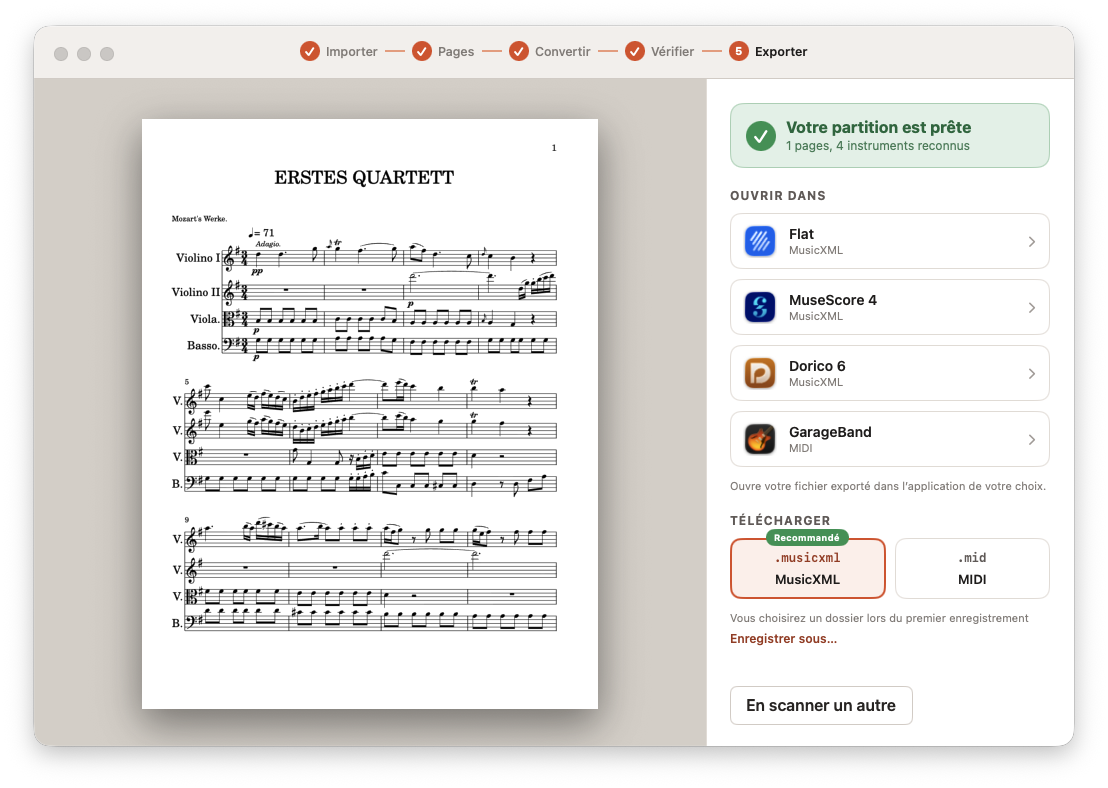
In Opuscan
- Go to the Export step.
- Under Open in, pick an app.
- If your app is not listed, choose Choose another app….
In Finder
- Right-click (or Control-click) the file.
- Choose Open With, then the app.
- To keep that choice, choose Other…, tick Always Open With, then open.
TextEdit and web browsers also appear in the list. They show the raw file, not the score.